
How to Check Your Driving License Print Status
You can check your smart license print status (स्मार्ट लाइसेन्स प्रिन्ट चेक) in a few simple steps.
- Find your driving license number on your revenue payment receipt, application or old driving license.
- Enter the complete license number in the checker above.
- Check the number carefully, including any hyphens.
- Click Check Status.
- If a matching record appears, check the name, transport office, date and source PDF.
- Contact your transport office to confirm whether your card is available for collection.
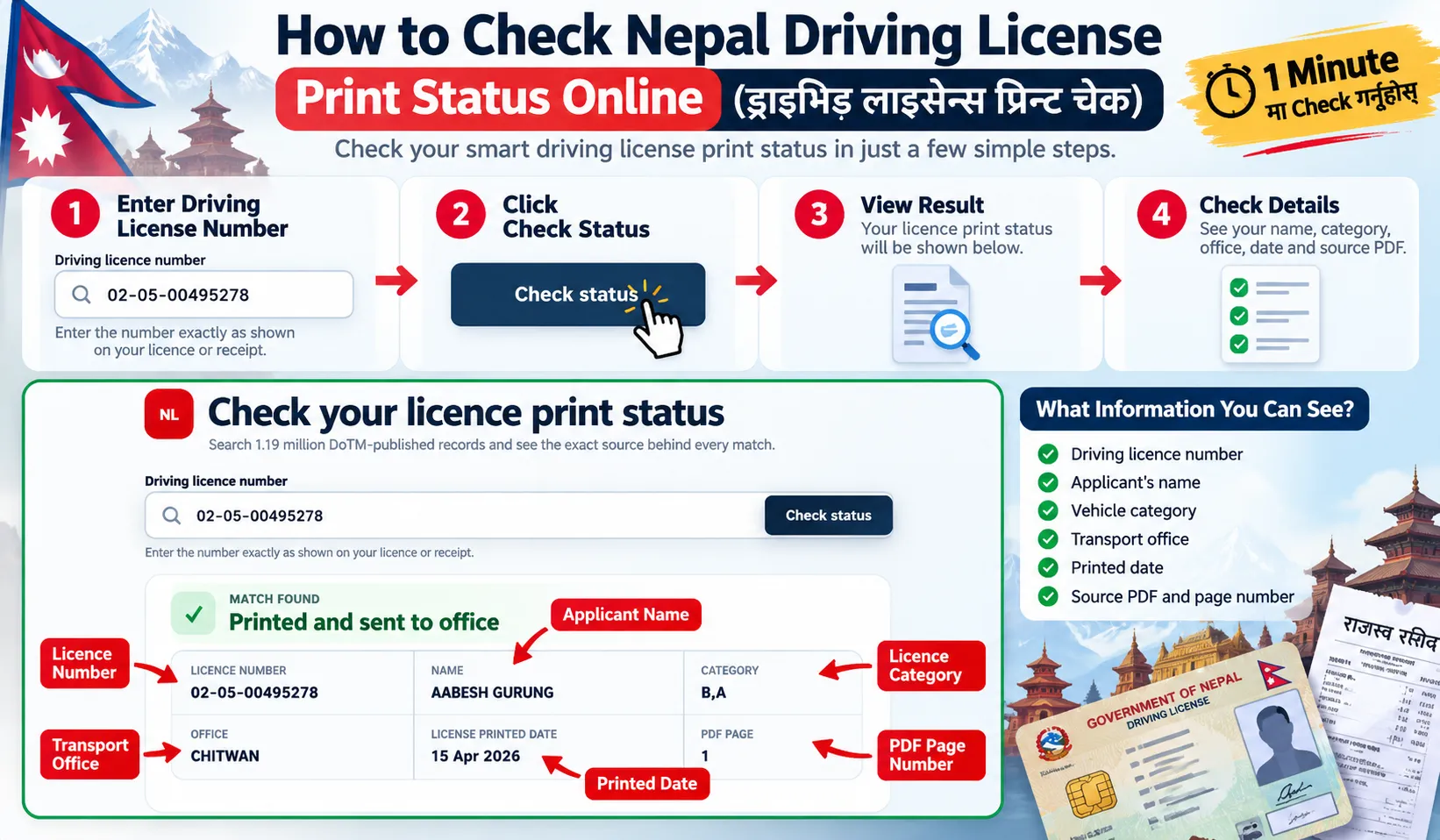
Most driving license numbers follow a format similar to XX-XX-XXXXXXXX. Always enter the number exactly as it appears on your document.
Do not enter your citizenship number, payment transaction ID or receipt number in the driving license field.
Understanding Your License Check Result
Your search may return a matching record or show that no record was found.
A printed record does not confirm that your card has reached your local office. Call before visiting.
Match Found
A matching result means your license number appears in at least one of the government lists.
Depending on the original PDF, the result will contain:
- Driving license number and applicant name
- Vehicle category and transport office
- Record date
- Regular or urgent list information
- Original PDF name, page number and source link
Check that the name and license number match your documents. Save the source details so you can refer to them when contacting your transport office.
Record Not Found
If your search returns "Record Not Found," don't assume your license application has been rejected.
Your record might be missing because:
- You entered the wrong license number.
- Your record appears in a newer government PDF.
- Your province uses a separate system.
- Your transport office is not fully covered by our database.
- Your application is still being processed.
Check your number again. If you still cannot find it, try the official provincial portal or contact the office where you paid your revenue fee.
Can I Check Nepal Driving License Print Status by SMS?
Type LC, leave a space, add your Application ID and send it to 33001.
LC [Application ID]For example: LC 12345678.
This is an older SMS method. If there is no reply, check online or contact your office.
How to Check Your License Print Status on the Official DoTM Website
You can also check your smart driving license print status through the official Department of Transport Management (DoTM) website.
DoTM provides a License Print Check option where you can check whether your driving license has been printed.
- Open the DoTM Online Driving License System.
- Select License Print Check.
- Enter the details requested by the official portal, such as your Application ID.
- Submit the details to check the available license print information.
DoTM also publishes printed driving license lists in PDF format for different offices or regions. If your license is included in one of these lists, you may need to open the relevant PDF and manually search for your details.
How to Check Smart Card Driving License Details?
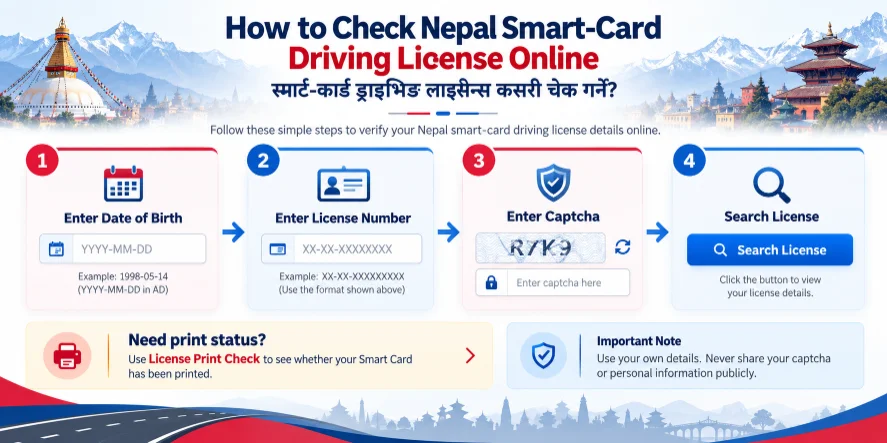
If you only want to verify your existing smart-card driving license details, use the separate Smart-Card License Search.
Enter your date of birth in YYYY-MM-DD format, driving license number, and captcha code. Then submit the form to view the available license details.
Print Records Database Coverage
Our database brings regular and urgent government license lists together so you can search without opening individual PDF files.
The current coverage is:
| Database details | Records |
|---|---|
| Unique searchable license records | 1,194,806 |
| Government source files | 63 |
| Regular office PDFs | 34 |
| Urgent license PDFs | 29 |
| Latest dated urgent record | June 22, 2026 |
| Database preparation date | October 7, 2026 |
The database preparation date is not the same as the government printing date. Although the current database was prepared in October 2026, the latest dated urgent record in this collection is from June 2026. As the government publishes new records, we will update our system.
When Does DoTM Publish New License Lists?
There is no fixed nationwide publication schedule. Based on the government files used to prepare our current database, the following updates are represented.
| Date | Available records |
|---|---|
| February 6, 2026 | Large regular-office record files |
| April 6, 2026 | Bardibas-related records |
| April 15, 2026 | Kalaiya and Chitwan-related records |
| April 20, 2026 | Radheradhe, Lahan, Janakpur, Dang, Dhangadhi and Baglung-related records |
| April 27, 2026 | Pokhara-related records |
| April 9 to June 22, 2026 | Multiple urgent license lists |
Driving License Print Check by Province
Nepal has separate online driving license portals for its seven provinces. The official EDLVRS directory lets applicants select the relevant province and access its services.
If your license number is not found in our database, check your provincial portal.
| Province | Official portal |
|---|---|
| Koshi | Koshi EDLVRS |
| Madhesh | Madhesh EDLVRS |
| Bagmati | Bagmati EDLVRS |
| Gandaki | Gandaki EDLVRS |
| Lumbini | Lumbini EDLVRS |
| Karnali | Karnali EDLVRS |
| Sudurpashchim | Sudurpashchim EDLVRS |
These portals provide provincial driving license services. However, their records and services may differ from the central PDF lists used by our checker.
Which Transport Offices Are Covered?
The following table shows the transport office locations represented in our current collection of government PDFs.
| Province | Offices represented in our database |
|---|---|
| Koshi | Jhapa, Itahari, Ilam, Gaighat/Udayapur, Dhankuta, Okhaldhunga |
| Madhesh | Lahan, Rajbiraj/Saptari, Malangwa/Sarlahi, Bardibas, Janakpur, Kalaiya/Bara, Gaur/Rautahat |
| Bagmati | Thulobharyang, Chabahil, Radheradhe, Banepa, Bharatpur/Chitwan, Khurkot |
| Gandaki | Pokhara, Dumre/Tanahun, Kawasoti, Baglung |
| Lumbini | Dang/Tulsipur, Parasi/Nawalparasi, Palpa |
| Karnali | Surkhet, Jumla, Chaurjahari/Rukum West |
| Sudurpashchim | Dhangadhi, Kanchanpur/Mahendranagar, Dipayal, Dadeldhura |
Office coverage is not the same in every province. Some offices may have fewer records or may publish their information separately.
For example, applicants from Butwal and Nepalgunj may not find all their records in our current collection. They should also check their provincial portal or contact their issuing office.
Some transport offices maintain separate printed-license searches and collection notices. These include:
Regular vs Urgent Driving License Print Lists
Regular license lists usually contain larger collections of printed or dispatched license records associated with transport offices. You can search these records using your driving license number.
Urgent license lists contain records published under urgent printing or distribution arrangements.
Urgent printing is also not available to every applicant. The government and relevant transport office determine the requirements.
How to Collect Your Printed Driving License
Once your license appears in a printed list, the next step is to confirm that your transport office has received the physical card.
Follow these steps before visiting your office.
- Check your driving license print status and save the result.
- Note your license number, transport office and any available Received ID or bundle number.
- Contact your transport office and ask whether your card has arrived.
- Confirm which original documents you need to bring.
- Visit the relevant office and follow its collection procedure.
Some offices use token systems to manage collection queues. If your office requires a token, ask how and when you can obtain one.
For example, an official Surkhet Transport Management Office collection notice instructed eligible applicants to bring their original citizenship document and revenue receipt to collect their smart cards. Requirements may differ at other offices.
Documents Required for License Collection
Keep these documents ready before visiting your Transport Management Office (यातायात व्यवस्था कार्यालय).
- Original revenue payment receipt (राजस्व तिरेको रसिद)
- Original citizenship card
- Old driving license, if you applied for renewal or category addition
- Driving license number
- Bundle number or Received ID, if available
- Online payment voucher or transaction evidence, if you paid online
The documents required depend on your application and transport office. Confirm the current requirements before travelling.
What Is a Driving License Bundle Number?
A bundle number helps a transport office identify or locate a group of printed driving license cards during sorting and distribution.
Some office systems show a bundle number when you search for your printed license. If yours is available, save it or take a screenshot before visiting the office.
However, not every transport office publishes bundle numbers, and not every government PDF contains them. Our checker does not currently show a bundle number or Received ID. Check your issuing office's portal or collection notice for these details.
Common Print and Collection Problems
These are some common problems applicants face after passing their driving trial, paying revenue or waiting for their smart cards.
01I Paid Revenue Online but Have No Paper Receipt
Keep your payment voucher, transaction ID or bank/wallet confirmation. Ask your issuing office whether it accepts this proof for collection before paying the fee again.
02I Passed My Driving Trial Five Days Ago. Why Hasn't My License Printed?
There is no fixed printing time after passing your trial. Keep your revenue receipt and check again when new lists are published.
03My License Shows Printed, but the Transport Office Says It Hasn't Arrived
Save your license number, name, record date and source PDF page. Give these details to your issuing office and ask whether it has received your card.
04I Lost My Original Revenue Receipt
Contact the office where you paid and ask about receipt verification or alternative payment proof. Keep your citizenship card, license number and transaction records ready.
05I Added a New Vehicle Category, but My Updated License Hasn't Printed
Category addition and renewal are separate procedures. Ask your issuing office whether your updated record is complete or needs any further action.
06Can I Request Urgent License Printing for Foreign Travel?
Ask your issuing office or DoTM whether you qualify for urgent printing. It may ask for your passport, visa, ticket or employment documents, depending on its requirements.
Other Ways to Check Your Nepal Driving License
Apart from our checker, you can use official government services to look up your driving license information.
1. Nagarik App
The Nagarik App (नागरिक एप) provides access to digital government services, including driving license information.
Open the app and look for the Driving License (सवारी चालक अनुमति पत्र) section.
If your license is not already linked, follow the instructions to connect it using the required details.
Review the information available in your account. If the app displays relevant license or payment details, you can keep them for reference.
2. Official DoTM Publications
Visit the Department of Transport Management website to find government announcements and publicly released license records.
Government lists may contain thousands of entries. If your record is available in our imported PDFs, you can use our checker instead of manually searching those files.
3. Provincial EDLVRS Portals
Use the official EDLVRS directory to select your province.
Depending on the province, the portal may provide services for new driving license applications, renewals, category additions and application-related information.
4. Local Transport Office
Your issuing transport office is the most useful place to confirm physical card collection.
Some offices publish separate printed-card lists, Received ID information and distribution notices.
If your record appears online but your card cannot be located, contact the issuing office directly.
Frequently Asked Questions
How can I check whether my Nepal driving license is printed?
Enter your driving license number above and click Check Status. If a match appears, check your name, office, record date and source PDF.
Can I check my driving license using my name?
Our checker searches by driving license number. It does not offer name-only searches.
Can I check using my citizenship number?
No, this checker uses your driving license number. Find it on your license or revenue receipt.
How long does it take to print a smart driving license in Nepal?
There is no fixed printing time for every applicant. It depends on your office, application and the printing backlog.
Does a matching record mean my license is ready for collection?
A matching record does not confirm that your local office has received the card. Contact the office before visiting.
Why can't I find my driving license record?
Check your number first; your record may be in a newer list or outside our current coverage. If it is still missing, try your provincial portal or contact your issuing office.
Can I check my driving license using the Nagarik App?
You can view available driving license information in the Nagarik App. Open the Driving License section and follow the steps to link your license.
Is a bundle number required to collect my driving license?
Some offices use a bundle number or Received ID to locate cards. Ask your issuing office whether you need one.
Can I collect my driving license without the original revenue receipt?
Ask your issuing office whether it accepts receipt verification or another payment record. The office decides which proof it can accept.
Is online payment proof accepted for license collection?
Keep your payment voucher, transaction ID and confirmation message. Ask your issuing office whether it accepts them for collection.
Is urgent driving license printing available in Nepal?
Ask DoTM or your issuing office about the current urgent printing process. Eligibility and required documents depend on that process.
Is this driving license print checker free?
Yes, the checker is free. You do not need to register or make a payment.
Before You Visit the Transport Office
Check your driving license number, save your matching result and note any available source PDF, bundle number or Received ID.
Confirm that your office has received the physical card. Take your original revenue receipt, identification and any other documents required for your application.
Checking these details before travelling can help you avoid unnecessary visits and collection problems.
Check your licence